
Robot Jacobians Explained With Real Examples in ROS 2

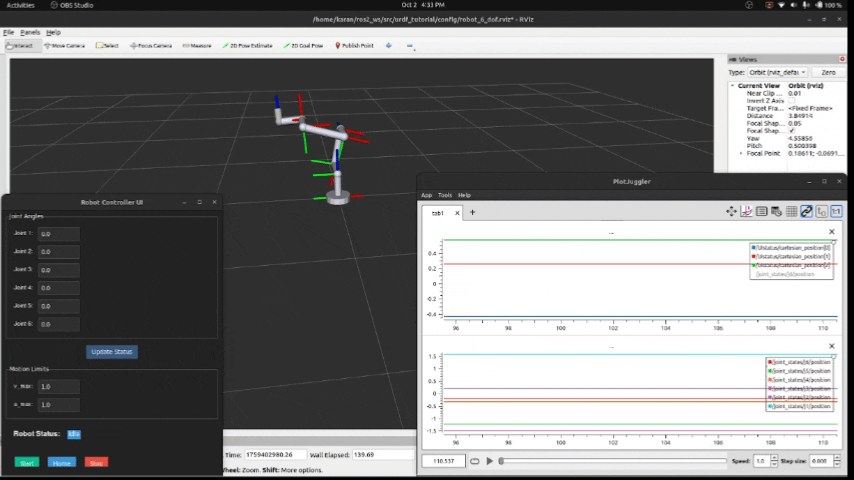
Have you ever tuned a controller in ROS 2 and thought, "Why is my end effector off by a few cm?" Or maybe your Cartesian jog feels smooth in RViz, but the real robot twitches. In many cases, the missing piece is the robot Jacobian.
The Jacobian is the math that connects joint motion to tool motion. It sits under velocity control, inverse kinematics (IK), and even force or compliance control. If you can predict how joint speeds change the tool's motion, you can debug faster and command motion with more confidence.
This guide keeps the math light and practical. You'll see what the Jacobian means, plus two concrete ROS 2 examples: a 2-link arm you can validate with tf2, and a 6-DOF arm using MoveIt 2 and ros2_control.
Jacobians in plain English: the map from joint speeds to tool speeds
A Jacobian is a matrix that tells you how joint velocities turn into end effector velocity. Think of it like a "gearbox" between two languages: joint space and Cartesian space.
The core idea fits in one line:
v = J(q) * q̇
q is the joint position vector (your current pose).
q̇ is the joint velocity vector (rad/s for revolute joints).
v is the tool "twist," meaning linear and angular velocity together.
J(q) is the Jacobian matrix, and it changes with the pose.
That last part matters. If you rotate an elbow, the same wrist speed can move the tool in a different direction. So the Jacobian is not a constant property of the robot. It's a property of the robot at a given configuration.
Here's a tiny numeric picture. Suppose you have a planar tool velocity (x and y only), and two joints. If, at one pose, the Jacobian is:
J = [[0.20, 0.05], [0.10, 0.30]]
and you command q̇ = [1.0, 0.0] rad/s, then:
v = J q̇ = [0.20, 0.10] (meters per second, if your Jacobian is in m/rad)
In other words, moving joint 1 at 1 rad/s pushes the tool +0.20 m/s in x and +0.10 m/s in y, at that pose.
If your controller "feels unstable," check whether you're using a Jacobian computed for the current joint angles. A stale Jacobian can act like bad calibration.
What the Jacobian actually gives you in robotics
In 3D robots, the Jacobian usually maps joint velocities to a 6D twist:
v = (vx, vy, vz, wx, wy, wz)
(vx, vy, vz) are linear velocities, in m/s.
(wx, wy, wz) are angular velocities, in rad/s.
Each column of J answers one simple question: "If I move joint i at 1 rad/s, what tool velocity do I get right now?"So you can read the Jacobian like a set of influence directions.
In ROS 2 workflows, this shows up in a few common places:
Cartesian teleop and jogging (move the tool in +X, not "joint 3 positive").
Velocity IK (compute q̇ that produces a desired tool velocity).
Compliance and force control (relating forces at the tool to torques at joints uses a Jacobian transpose).
Singularity checks (if the Jacobian loses rank, some tool motions become impossible or require huge joint speeds).
Geometric vs analytic Jacobian (and when ROS users should care)
You'll hear two terms: geometric Jacobian and analytic Jacobian.
The geometric Jacobian maps to angular velocity (wx, wy, wz). It behaves well for most control tasks.
The analytic Jacobian maps to Euler angle rates (roll, pitch, yaw rates). That mapping can blow up near certain angles because Euler angles have their own singularities.
For most ROS 2 control and MoveIt Servo style tasks, stick with the geometric Jacobian unless you have a strong reason not to. It matches the "twist" that tools like tf2 and many controllers already use.
Real Jacobian examples you can reproduce in ROS 2
You don't need a fancy lab setup to build intuition. A good test is to predict motion using J(q) q̇, then compare it to a measured pose change from tf2 over a short time.
These examples work well on ROS 2 Humble or Iron, which are still common baselines in March 2026. The steps stay version-agnostic, though.
Example 1: a 2-link planar arm, compute J by hand, then confirm in ROS 2
Set up a simple planar arm in the XY plane:
Two revolute joints: q1 at the base, q2 at the elbow
Link lengths: L1, L2
End effector position:
x = L1 cos(q1) + L2 cos(q1 + q2)
y = L1 sin(q1) + L2 sin(q1 + q2)
The planar Jacobian for position is the partial derivatives of (x, y) with respect to (q1, q2):
∂x/∂q1 = -L1 sin(q1) - L2 sin(q1 + q2)
∂x/∂q2 = -L2 sin(q1 + q2)
∂y/∂q1 = L1 cos(q1) + L2 cos(q1 + q2)
∂y/∂q2 = L2 cos(q1 + q2)
So:
J(q) = [[\∂x/∂q1, ∂x/∂q2],[\∂y/∂q1, ∂y/∂q2]]
What do the terms mean? If sin(q1 + q2) is large, a small joint motion creates a big sideways sweep. If cos(q1 + q2) is near zero, that joint barely changes y at that pose.
Now validate it in ROS 2:
Put the arm in a URDF, then run robot_state_publisher.
Publish sensor_msgs/JointState for q1 and q2 (even a simple publisher works).
Use tf2 to read the end effector transform, for example base_link to ee_link.
Choose a small joint velocity q̇ and a small time step dt (like 10 to 20 ms).
Predict tool motion: Δp_pred ≈ (J(q) q̇) dt.
Measure tool motion: Δp_meas from the tf2 pose difference over the same dt.
Keep dt small because the Jacobian is a local linear approximation. Also expect noise from timestamps and scheduling. A light filter on the measured pose change helps.
The fastest sanity check is finite differences: move a joint by a tiny amount, measure the pose change, and compare to the Jacobian column.
Example 2: a 6-DOF arm in MoveIt 2, get the Jacobian and use it for a Cartesian motion
Here's a real situation: you want to move the tool 1 cm in +X to align with a part, and you don't want to run a full plan. This is where Jacobian-based velocity IK shines.
High-level flow in ROS 2 with MoveIt 2:
Get the current robot state (joint positions) from /joint_states or MoveIt's state monitor.
Ask MoveIt 2 for the Jacobian of your planning group at that state, for your chosen end effector link (for example tool0 or ee_link).
Define a desired twist in the same reference frame MoveIt uses, typically a base frame:
vx = 0.01 m/s (small), vy = vz = 0
wx = wy = wz = 0
Solve for joint velocities using a damped least-squares method:
q̇ = Jᵀ (J Jᵀ + λI)⁻¹ v
λ is a small damping term that keeps things stable near singularities.
Send q̇ to a ros2_control velocity interface (or a controller that accepts joint velocity commands).
Run it for a short time, then stop and re-check the pose.
A few practical rules keep this safe:
Keep motions small and speeds low, especially on hardware.
Check joint limits and velocity limits every cycle, then clamp if needed.
Use the correct link name for the tool. A mismatch can look like "wrong math."
If the arm starts to jitter, increase damping (λ) and reduce vx.
This approach also pairs well with simulation. In Gazebo or another simulator, you can test the same Jacobian loop before touching a real robot.
Debugging tips: singularities, frames, and the top mistakes in ROS 2 Jacobian work
Most Jacobian bugs aren't about math errors. They come from frames, stale state, or getting too close to a singularity.
Singularities and near singular behavior (why your robot suddenly gets jumpy)
A singularity happens when the Jacobian loses rank. In plain terms, the robot can't move in some tool direction without extreme joint motion.
Common symptoms:
Joint speeds spike even for tiny tool commands.
The tool slows down or drifts off-axis.
Servo control oscillates or feels "nervous."
Fixes that work well in ROS 2 control loops:
Add damping (increase λ in damped least-squares).
Lower Cartesian speeds near risky poses.
Avoid known bad configurations (like a fully stretched elbow).
Monitor a manipulability measure derived from J, then back off when it drops.
Frame mix-ups: base link, tool link, and why the same Jacobian can look "wrong"
A Jacobian depends on two choices: the reference frame you express velocity in, and the point on the robot (which tool link and which offset). Mix those up and results look nonsense.
Quick ROS 2 checks that save hours:
Use tf2 tools to confirm the transform chain and timestamps (watch for latency).
Verify the end effector link name in MoveIt 2 matches your URDF and SRDF.
Keep frames consistent between the Jacobian request and your desired twist.
Confirm joint axis directions in the URDF, because a flipped axis flips a Jacobian column.
Re-run the finite-difference test: tiny joint change, then compare measured pose change to the matching Jacobian column.
Conclusion
A Jacobian maps joint speeds to tool speeds, and it changes with the robot's pose. Once that clicks, many ROS 2 control problems get easier to debug. Better yet, you can validate the math against real motion using tf2 and a short time step.
Next, try the 2-link finite-difference check in your own URDF. After that, test a tiny Cartesian nudge on a simulated 6-DOF arm with MoveIt 2 and a velocity controller. Keep steps small, confirm frames, and add damping when motion starts to get jumpy.


Comments